A Clear Guide to Click Wrap Contracts and Implementation
Understand how click wrap contracts create legally binding agreements. Learn the key elements, best practices, and how to implement them for secure consent.


Tired of nonsense pricing of DocuSign?
Start taking digital signatures with BoloSign and save money.
If you've ever signed up for an online service, you’ve definitely come across a clickwrap contract. It’s that moment you tick a checkbox and click a button that says "I Agree" or "I Accept" before you can move forward. That simple action creates a legally binding agreement between you and the service provider, acting as the modern-day equivalent of a handwritten signature.
Unpacking the Digital Handshake
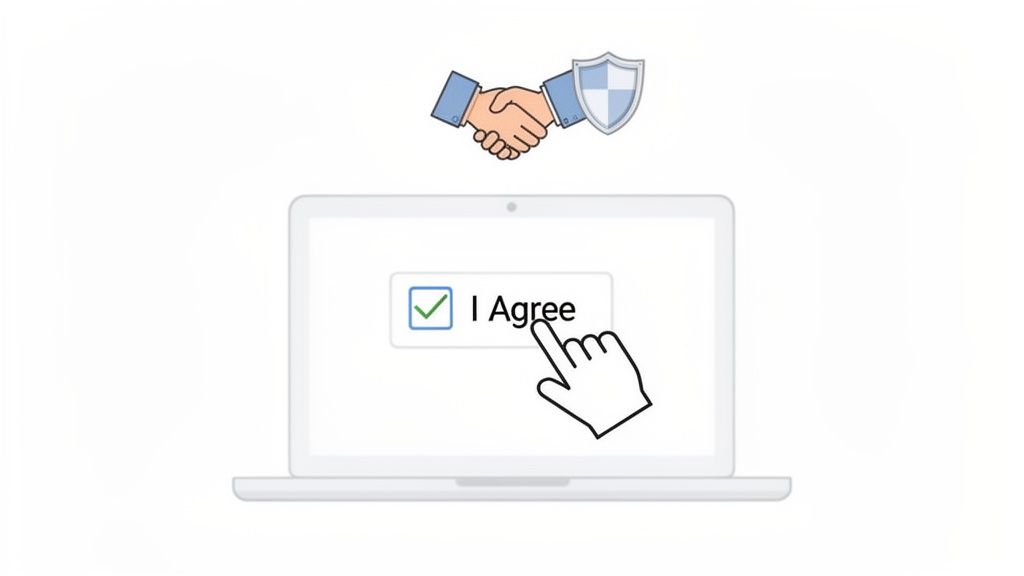
Think of a clickwrap contract as a digital handshake. Instead of offering a hand, a user clicks a button to show they explicitly consent to your terms and conditions, privacy policy, or service level agreement. This active, deliberate step is what makes it such a powerful and legally enforceable tool for businesses that manage a high volume of standard agreements.
Unlike a traditional wet signature on paper, this process is instant, scalable, and designed for the speed of modern business. It’s the engine powering countless online transactions, from software installations to social media sign-ups.
Why Active Consent Matters
The real strength of a clickwrap contract comes from its requirement for affirmative user action. The user has to physically click a box or a button that is clearly labeled to show they agree. This gets rid of any ambiguity and provides solid proof that the user was given fair notice of the terms and consciously accepted them.
This is a huge deal for legal defensibility. Courts consistently uphold these agreements when a business can prove the user had a clear chance to review the terms and then actively consented.
For example, a logistics company onboarding a new shipping partner can use a clickwrap for their service terms. The partner must check "I agree to the Partner Service Agreement" before they can get into the shipping portal, which creates an undeniable record of consent.
From Simple Click to Secure Record
While the user's action is simple, the backend process that makes it legally sound is much more complex. A basic checkbox on a website isn't enough; you need a system that captures and saves the evidence of that agreement. This is where a robust digital signing solution is essential.
A clickwrap agreement's enforceability depends on the ability to prove who agreed, what they agreed to, and when they agreed. Without a verifiable audit trail, a simple "I Agree" click loses its legal weight.
Platforms like BoloSign turn this simple click into a secure, compliant, and automated workflow. BoloSign doesn’t just show the terms; it manages the entire lifecycle, making sure every agreement is backed by a tamper-proof audit trail. This trail captures critical data points like timestamps, IP addresses, and the exact version of the document the user accepted.
Elevating Agreements with Automation and AI
Modern businesses need more than just a record of consent—they need efficiency and intelligence. BoloSign integrates powerful contract automation to handle these workflows at scale. Instead of manually managing terms for every new user or client, organizations can instantly create, send, and manage PDFs, templates, and forms.
This is especially valuable in industries with repetitive onboarding:
- Staffing: A recruitment agency can automate sending employment terms and NDAs to thousands of candidates, ensuring each one actively agrees before their profile is processed.
- Healthcare: A clinic can manage patient intake by having them accept privacy policies and consent-to-treatment forms via clickwrap, all while maintaining strict HIPAA compliance.
- Education: An online learning platform can require students to accept an academic integrity policy before getting access to course materials.
With BoloSign, this entire process is centralized. Our platform offers unlimited documents, templates, and team members at a single fixed price, making it up to 90% more affordable than alternatives like DocuSign or PandaDoc. By combining AI-powered contract intelligence with secure, compliant eSignatures, we make sure every "I Agree" is not just a click, but a defensible and efficiently managed record.
Ready to see how simple and secure your agreements can be? Start your 7-day free trial to experience BoloSign's powerful features firsthand.
Understanding Different Online Agreements
Not all online agreements are created equal, and knowing the difference is critical to protecting your business. The way you present your terms and get consent can be the difference between a legally binding contract and a suggestion that won't hold up in court. Let's break down the three most common types of online agreements you'll encounter.
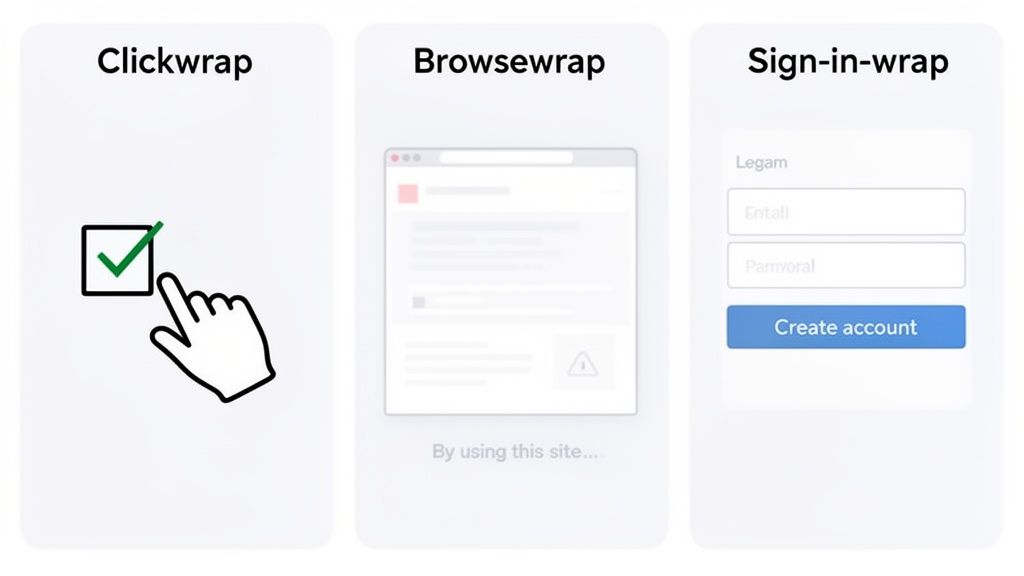
The main distinction comes down to how each one gets a user's consent—from explicit and active to totally passive and implied. That single factor has massive legal consequences.
Clickwrap: The Gold Standard of Consent
A clickwrap agreement is the most robust and legally accepted way to secure consent online. It requires users to take a clear, affirmative action—like checking a box or clicking a button labeled "I Agree"—before they can move forward. This explicit action creates an undeniable record of consent that's incredibly difficult to argue against later.
Because it offers such clear proof of agreement, clickwrap is the go-to choice for any high-stakes situation where you can't afford any legal ambiguity.
- Healthcare: A telehealth provider uses a clickwrap to get a patient's explicit consent for treatment and their privacy policy acknowledgment before a virtual visit. This is key for ensuring HIPAA compliance.
- Logistics: A freight platform requires carriers to accept its terms, including liability and payment clauses, with a clickwrap before they can even see the load board.
Browsewrap: The Risky, Passive Approach
On the complete opposite end of the spectrum is the browsewrap agreement. This method basically assumes a user agrees to the terms just by continuing to use the website. You'll typically see a link in the site's footer with text like, "By using this site, you agree to our Terms of Service."
This passive approach is legally weak. Courts often rule browsewrap agreements unenforceable because a business simply can't prove the user ever saw the terms, let alone read or agreed to them. For most business applications, the risk is just too high.
Sign-in-Wrap: The Middle Ground
Sign-in-wrap agreements tie the acceptance of terms to another action, usually creating an account or signing in. For example, you might see text next to a "Create Account" button that says, "By creating an account, you agree to our Terms and Conditions."
While it's certainly stronger than browsewrap, it can still be a bit murky if not designed perfectly. The legal strength of a sign-in-wrap really depends on how clearly the terms are presented and how direct the connection is between the user's action and their acceptance.
The core difference lies in the evidence. With clickwrap, you have a direct, provable action of consent for every single user. With browsewrap and, to a lesser extent, sign-in-wrap, you are often left guessing whether the user ever truly agreed.
This isn't just a matter of opinion; it's backed by a global legal consensus. Clickwrap agreements have gained widespread legal recognition in over 100 countries, including the US, Canada, Australia, and the UAE. Courts consistently uphold them when users take an explicit action to agree and the terms are clearly presented—a standard that browsewrap methods almost always fail to meet.
Comparing Online Agreement Types
To make the practical differences crystal clear, it helps to see these three methods side-by-side. The table below breaks down how each one handles consent, its legal strength, and where it's best used.
| Agreement Type | Consent Mechanism | Legal Enforceability | Best For |
|---|---|---|---|
| Clickwrap | Active and Explicit (e.g., clicking "I Agree") | High. Widely upheld in courts globally. | Essential business agreements, patient consent forms, high-value transactions, and software licenses where certainty is required. |
| Browsewrap | Passive and Implied (e.g., "By using this site...") | Low. Frequently challenged and found unenforceable. | Low-risk scenarios like simple blogs or informational websites, though it still carries significant legal risk. |
| Sign-in-Wrap | Bundled (e.g., "By signing up, you agree...") | Moderate. Enforceability depends on the clarity of notice. | Account creation, social media sign-ups, and subscription services, but requires careful implementation. |
Ultimately, for any business that can’t afford legal gray areas, the choice is clear. While other forms like comprehensive terms of service agreements are foundational, a well-designed clickwrap process provides the legal certainty you need to operate with confidence.
The Key Elements of an Enforceable Agreement
A clickwrap contract is only as strong as its evidence. While the user's click seems simple, a few critical components have to work together behind the scenes to make that agreement legally defensible. Moving past legal theory, courts focus on practical, real-world elements that prove a user was given fair notice and knowingly consented.
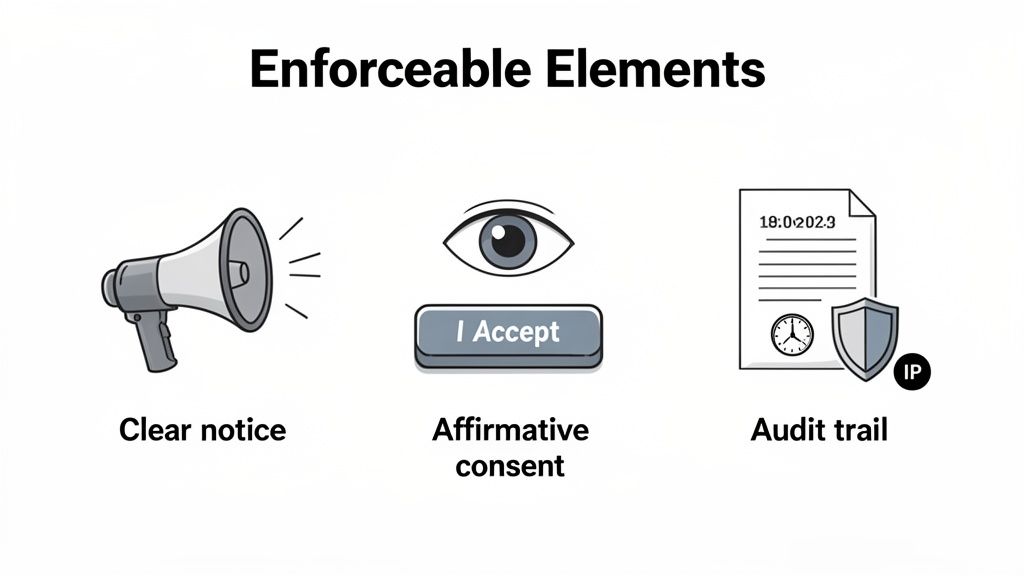
This means the user experience (UX) and user interface (UI) of your agreement process are not just design choices—they are the very foundation of your contract's enforceability. Getting these details right is what separates a binding agreement from one that falls apart under scrutiny.
Clear and Conspicuous Notice
First things first: the user absolutely must have a reasonable chance to review the terms. Hiding a link in a footer or burying it in a dense wall of text just won't cut it. The presentation has to be clear, obvious, and right where the action is happening.
Legal precedent is crystal clear on this. If a user has to go hunting for the terms, the agreement is almost certainly unenforceable. The notice should be prominently displayed right next to where you're asking them to agree.
This principle comes down to the design itself:
- Readable Font: The text needs to be large and clear enough for anyone to read easily, no matter the device.
- Accessible Link: If the full terms are in another document, the link must be immediately visible and clearly labeled (e.g., "View Terms of Service").
- No Pre-Checked Boxes: The user must perform the action themselves. Consent can't be assumed or defaulted.
Unambiguous Affirmative Consent
The user’s action has to be a clear, deliberate signal of their agreement. This is where vague language can get you into serious trouble. A button that just says "Continue," "Download," or "Let's Go" is ambiguous. Is the user agreeing to your terms, or are they just trying to get to the next step?
To make consent undeniable, the call to action must be explicit. Use straightforward language that leaves no room for interpretation, such as:
- "I Accept the Terms and Conditions"
- "I Agree"
- "By clicking here, I agree to the Privacy Policy"
For instance, a professional services firm onboarding a new client should use a button that says, "I Agree to the Master Service Agreement," not a generic "Submit." This specificity is a core pillar of a defensible clickwrap contract. To learn more about what makes any contract valid, check out our guide on the essential elements of a valid contract.
The Indisputable Audit Trail
Perhaps the most critical piece of the puzzle is what happens after the click. A secure, comprehensive audit trail is your undeniable proof that an agreement actually took place. It’s the digital evidence log that answers the crucial questions of who, what, and when.
A clickwrap without an audit trail is like a verbal agreement with no witnesses. The moment it's challenged, you have no way to prove what was actually agreed upon.
This is where a dedicated digital signing solution like BoloSign becomes indispensable. Our platform automatically captures and preserves a complete, tamper-proof record for every single agreement, no extra work required.
This audit trail includes vital information:
- Who: The identity of the signer (like their name, email address, or account ID).
- What: The exact version of the terms the user saw and accepted. This is crucial if you ever update your policies.
- When: A precise, cryptographically-secured timestamp marking the moment of acceptance.
- Where: The user’s IP address to provide geographical context.
This level of meticulous record-keeping is essential for staying compliant with global standards like the ESIGN Act in the US and GDPR in Europe. For a healthcare provider, this trail is what proves a patient consented to a specific treatment plan, ensuring HIPAA compliance.
With BoloSign, this powerful evidence is generated automatically. We provide the infrastructure to not only present your terms clearly but also to back every single click with an unbreakable chain of evidence, giving you complete peace of mind.
Designing for Higher Acceptance Rates
A confusing or frustrating agreement process is a dead end. It kills conversion rates before a business relationship even gets off the ground. When you present users with dense walls of legal text or a clunky mobile experience, they'll often just give up and walk away. But with the right design strategies, you can eliminate that friction, build trust, and get significantly more agreements completed.
The goal isn't to trick people into agreeing to something they don't understand. It's about making the process so transparent and intuitive that they feel confident saying "yes." From a business standpoint, a smooth experience ensures your legally sound clickwrap contracts actually get signed, protecting your company without tanking user engagement.
Diagnosing and Solving User Friction
The number one reason for abandonment is almost always a poor user experience. When a potential client or new hire is ready to commit, the last thing you want is for them to be turned off by a badly designed agreement.
Here are the usual suspects behind low acceptance rates and how you can fix them:
- The Wall of Text: Long, complicated legal paragraphs are intimidating. Instead, offer a concise, easy-to-read summary of the key terms right at the top, with a clear link to the full document. This simple move shows respect for the user's time and builds immediate trust.
- A Broken Mobile Experience: It’s a fact: most people will see your agreement on their phone. A mobile-first design with responsive text, big tap-friendly buttons, and easy scrolling isn’t just a nice-to-have anymore—it’s non-negotiable.
- Vague Calls to Action: Buttons that just say "Continue" or "Next" create uncertainty. Use explicit, direct language like "I Agree to the Terms" to remove any doubt about what the user is actually doing.
BoloSign was engineered from the ground up with these best practices in mind. Our platform lets you build simple, intuitive signing experiences that are proven to boost acceptance rates, structuring your agreements for clarity on any device.
The Impact of Simplified Design on Acceptance
Improving the user experience isn't just about making things look nice; it has a real, measurable impact on your bottom line. Industry benchmarks show a big gap between acceptance rates in controlled tests (85% to 95%) and what happens out in the wild (70% to 80%). The good news? Research shows that simple design changes—like adding short summaries, optimizing for mobile, and using progress bars—can boost acceptance rates by 20% to 30%. You can discover more insights on clickwrap acceptance rates to see how small tweaks deliver huge results.
An intuitive, user-friendly agreement process does more than just secure a signature—it builds trust from the very first interaction, setting a positive tone for the entire business relationship.
This is especially critical in high-volume industries. Picture a professional services firm that embeds a clean, simple clickwrap into its client portal. The client reviews a quick summary of the engagement terms, clicks "I Agree," and instantly completes their onboarding. That frictionless process cuts down on administrative overhead and gets the project started without any unnecessary delays. To better understand the user's perspective, it helps to review the basics of how to sign a document online and what they've come to expect.
With BoloSign, you can put these high-conversion strategies to work effortlessly. Our platform gives you all the tools to create user-friendly agreements and automate the entire workflow. And because we offer unlimited documents and templates at one fixed price—making us up to 90% more affordable than competitors like DocuSign—you can optimize every single agreement without ever worrying about costs creeping up.
Ready to create a better signing experience? Start your 7-day free trial and see how BoloSign makes it easy to design clickwrap agreements that users are happy to accept.
How to Automate Click Wrap Workflows with BoloSign
Knowing the theory behind click wrap contracts is one thing, but putting it into practice is what really modernizes how you handle agreements. Trying to manage them manually just doesn’t work, especially for a growing business. Automation is the only way to build a workflow that's efficient, compliant, and cost-effective—turning what could be a headache into a real advantage.
With a platform like BoloSign, you can build, deploy, and manage your clickwrap agreements without getting bogged down in the details. The process is designed to be simple, letting you focus on your business while the tech handles the heavy lifting of securing and tracking consent.
Creating and Deploying with Reusable Templates
One of the biggest time-wasters in contract management is reinventing the wheel for every new agreement. BoloSign gets rid of this by letting you create and save reusable templates for all your common agreements, like NDAs, terms of service, or client intake forms.
Once a template is ready, sending it out is a breeze. You can generate a unique signing link or plug it directly into your existing systems, which keeps everything consistent and compliant every single time.
For instance, a real estate agency can create a template for a standard lease agreement. With a few clicks, they can send it to new tenants, who can review and sign it instantly on their phones. The HR team doesn't have to lift a finger, and this contract automation ensures no one slips through the cracks.
Seamless Integration with Your Existing Workflows
To create a truly smooth experience, your clickwrap agreements need to be where your users already are—on your website, inside your app, or right in your client portal. This is where BoloSign’s powerful integrations and API are essential. You can embed the entire eSignature and clickwrap process directly into your digital platforms.
This deep integration brings some major wins:
- Better User Experience: People never have to leave your site or app to agree to terms, which cuts down on friction and gets more agreements completed.
- Total Customization: You can make the agreement process look and feel just like your brand, creating a professional, cohesive experience.
- Real-Time Data Sync: As soon as an agreement is signed, the data syncs back to your systems, kicking off the next step in your workflow automatically.
Think of a healthcare provider embedding patient consent forms into their online check-in. A patient can review and accept the terms on a tablet in the waiting room, and their consent is immediately logged in their health record, keeping everything HIPAA compliant.
AI-Powered Intelligence and Unbeatable Affordability
Modern contract workflows need more than just automation; they need to be smart. BoloSign includes AI contract review features to help you manage risk and stay compliant with standards like ESIGN and eIDAS. Our AI tools can analyze agreement data, flag unusual terms, and give you insights to make your legal position even stronger.
This infographic breaks down a simple but powerful flow for getting more of your agreements accepted.
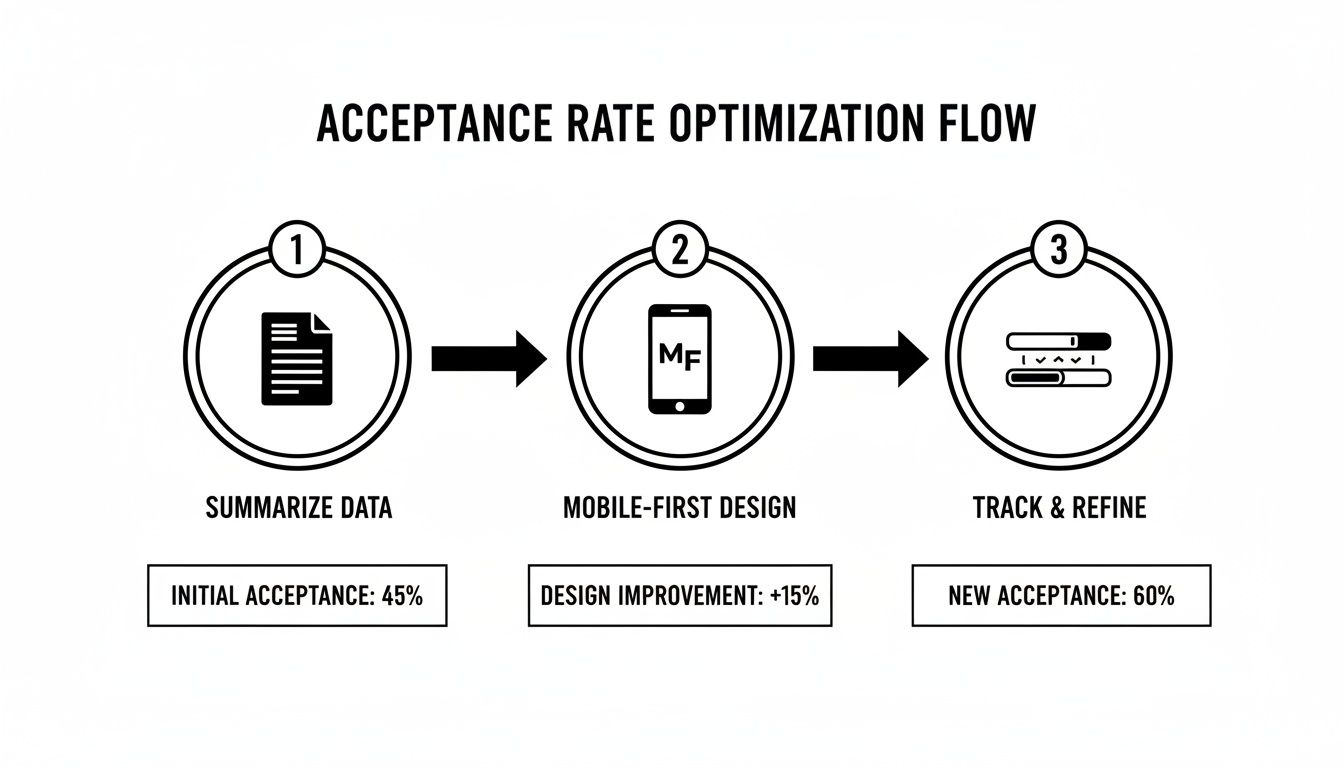
As you can see, summarizing your terms, designing for mobile users first, and tracking progress are key steps to reduce friction and get people to say "yes" more often.
Enterprise-level contract automation should be accessible to everyone, not just companies with massive legal budgets. True scalability comes from powerful technology at a predictable, affordable price.
That idea is at the heart of BoloSign’s pricing. We offer unlimited documents, unlimited templates, and unlimited team members for one flat price. This simple approach makes BoloSign up to 90% more affordable than competitors like DocuSign or PandaDoc, who often charge per document or user—basically penalizing you for growing.
To learn more about managing the entire contract process from start to finish, check out our guide on CLM software.
By combining a user-friendly platform, powerful integrations, and a pricing model that makes sense, BoloSign gives organizations of all sizes the power to build scalable, secure, and affordable clickwrap workflows.
Frequently Asked Questions
Got questions about clickwrap contracts? You're not alone. Here are some straightforward answers to the questions we hear most often, clearing up the confusion around how these agreements work in the real world.
Are Clickwrap Agreements Legally Binding?
Yes, absolutely. Courts in major markets around the globe have consistently upheld clickwrap agreements as legally binding contracts. In the United States, their validity is cemented by the Electronic Signatures in Global and National Commerce (ESIGN) Act, while the eIDAS regulation provides a similar legal backbone across the European Union.
But there’s a catch: their power depends entirely on how they’re implemented. For a clickwrap to be enforceable, you have to prove you gave the user clear notice of the terms and that they took a distinct, undeniable action to show they agreed.
How Do You Prove a User Agreed to the Terms?
Proof is all about the audit trail. A simple checked box isn't enough; you need a rock-solid, verifiable record of the entire acceptance event. This is where a dedicated digital signing solution like BoloSign becomes essential for managing risk.
For every single agreement, BoloSign’s platform automatically captures and preserves the evidence needed to build a defensible record. This includes:
- The exact version of the terms the user saw and accepted.
- A precise, cryptographically secured timestamp of the moment they agreed.
- The user's IP address, providing additional context for the transaction.
This level of detail turns a simple click into concrete evidence, ready to stand up to scrutiny if your agreement is ever challenged. Best of all, the process is fully automated, so you stay compliant without lifting a finger.
What If I Need to Update My Terms?
Updating your terms of service or privacy policy is a normal part of business, but you have to handle it the right way to keep your agreements valid. The only safe way is to notify your users about any significant changes and require them to accept the new version with another clickwrap.
Just posting a banner that says "we've updated our terms" won't cut it. To maintain enforceability, you must get fresh, affirmative consent for the updated agreement. This ensures everyone is on the same page and actively agrees to the current policies governing your relationship.
Ready to streamline your agreement workflows with secure, automated, and affordable clickwrap contracts? With BoloSign, you can create, send, and manage unlimited documents for your entire team, all for one fixed price that's up to 90% more affordable than other providers.
Start your 7-day free trial today to experience the power of AI-driven contract intelligence and compliance firsthand.

Paresh Deshmukh
Co-Founder, BoloForms
23 Jan, 2026
Take a Look at Our Featured Articles
These articles will guide you on how to simplify office work, boost your efficiency, and concentrate on expanding your business.

Compare the best AI contract review tools for 2025. See features, benefits, and practical tips to implement them at scale. Explore BoloSign’s unified solution.
Paresh Deshmukh
Co-Founder, BoloSign

Learn if clickwrap agreements are legally binding, how they work, and key best practices for enforceability.
Paresh Deshmukh
Co-Founder, BoloSign
Ready to streamline your contract management with AI?
Contact Sales
AI assistant to draft, review, and eSign contracts on autopilot for fastest growing companies.
Email: support@boloforms.com


Sales Inquiry
Available On


AI assistant to draft, review, and eSign contracts on autopilot for fastest growing companies.
Email: support@boloforms.com
Company
Solutions
Resources
Legal & Security
Sales Inquiry
Available On